
Guide
Golf Simulator Setup in a Garage, Basement or Spare Room
Swinglix may earn a commission when you buy through links on this page, at no extra cost to you. Learn more
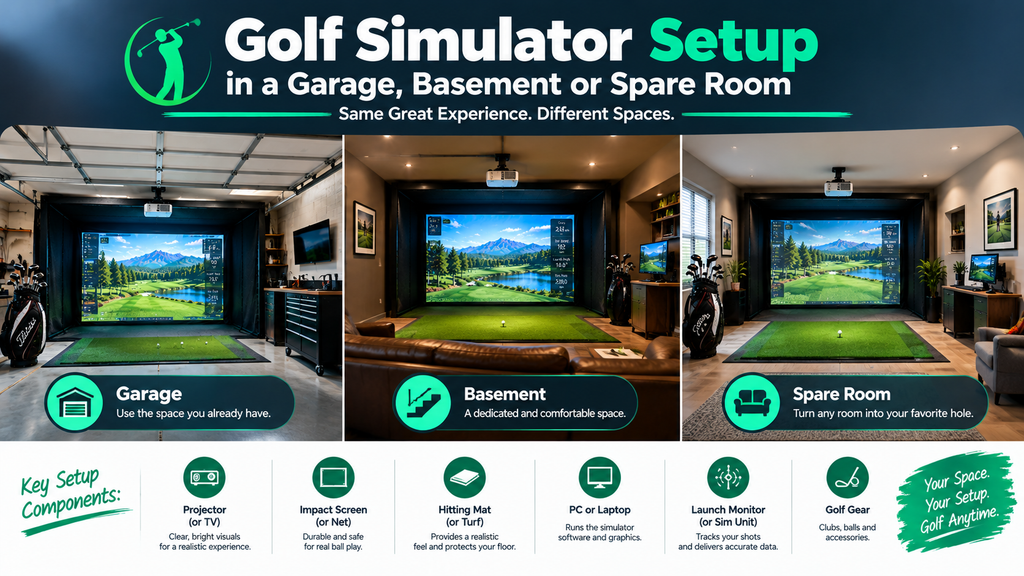
Can you put a golf simulator in your garage, basement or house? In most homes, yes. A golf simulator setup needs roughly 9–10 feet of ceiling height, 12–15 feet of width and 15–20 feet of depth, and garages and basements often have that. A spare room can work too if it’s long enough.
Each space has its own problems: garage doors that steal headroom, sloping concrete, cold winters, low basement beams, damp, and noise travelling to the rest of the house. This guide shows you how to check whether a simulator fits, then walks you through preparing a garage, a basement or a spare room step by step, with fixes for the problems you’re most likely to hit. For the full build from empty room to first shot, see our guide to an at home golf simulator setup.
Key Takeaways
- Garages usually have the width and depth, but the door, tracks and opener can steal a foot or more of headroom, the floor slopes, and they get cold.
- Basements are warm and quiet, but low beams, ducts, posts and damp need planning.
- Spare rooms work when they’re long enough; a retractable screen keeps the room usable.
- Camera launch monitors beside the ball suit most garages and basements because they need the least depth.
- Prepare the space before the enclosure goes up: power, flooring, heating and damp control are much harder to add afterwards.
Will a Golf Simulator Fit? Quick Check
| Space | Typical ceiling | Usually fits? | Main things to check |
|---|---|---|---|
| One-car garage | 8–10 ft | Often, if long enough | Width for your swing; door tracks and opener |
| Two-car garage | 8–10 ft | Usually | Headroom under the door mechanism; parking |
| Basement | 7.5–9 ft | Sometimes | Beams, ducts and pipes; posts |
| Spare bedroom | 8–9 ft | Sometimes | Depth, ceiling, windows and doors |
| Bonus room / loft | Varies | Often | Sloped ceilings; floor strength and noise below |
How to check your space in 15 minutes
You’ll need a tape measure, painter’s tape, a step ladder and your driver.
- Pick the screen wall. Usually the longest clear run of the room, facing away from doors and windows.
- Measure the depth from that wall to the opposite wall. Under about 15 feet, plan on a camera launch monitor beside the ball; 16–20 feet or more allows radar units behind you.
- Mark where you’ll stand, about 9–12 feet out from the screen wall, and measure the width either side. Roughly 5 feet each side of you is comfortable.
- Measure the ceiling at its lowest point above that spot: the lowest beam, duct, light, or the garage door when it’s open.
- Swing slowly with your driver at that spot while someone watches the clubhead at the top of the backswing and the finish.
Check: if the club clears everything with several inches to spare at slow speed, and the depth works for the launch monitor you want, the space will work. If not, see the fixes below or our guides to how much space you need and how high a ceiling you need.
What a full golf simulator setup includes
- Launch monitor
- Enclosure or frame with side netting
- Impact screen
- Hitting mat (and optional stance mat and turf)
- Projector, or TV/tablet for simpler setups
- Computer and simulator software
- Padding, lighting and cables
For prices of each part, see how much a golf simulator costs; for ready-made bundles, see golf simulator packages.
Golf Simulator in a Garage
The garage is the most popular spot for a home simulator. Most two-car garages are around 20 feet deep and 20 feet wide, which is enough for most launch monitors and lets left- and right-handed golfers share the space.
How to prepare a garage for a golf simulator
- Measure the door clearance. Open the garage door fully and measure from the floor to the lowest point of the door, its tracks and the opener over the hitting area. Do the same with the door closed. Check: if the open door is lower than your swing needs, you’ll either play with the door closed or move the bay towards the back of the garage, away from the door mechanism.
- Decide whether to move the opener. A ceiling-mounted opener in the middle of the garage often sits right above the best hitting spot. A wall-mounted (jackshaft) opener mounts beside the door and frees the ceiling; a garage door installer can advise whether your door suits one.
- Choose the bay position. Usually against the back wall, facing the door, so the door mechanism is behind or above the screen rather than over your swing. If you still park in the garage, tape out the car space and the bay together.
- Check the floor slope. Garage floors usually slope towards the door so water drains out. Lay a long straight board where the mat will go and put a spirit level on it. If the bubble is clearly off-centre, plan a level base (see “Fixing a sloping garage floor” below).
- Plan power. You’ll need outlets near the projector (often on the ceiling), the PC and the launch monitor charger. A licensed electrician can add them; new wiring usually needs a permit.
- Sort out the temperature. Insulate the door first, then add heating or cooling (see the table below). Electronics and screens work best at normal room temperature.
- Control daylight and dust. Blinds or film on windows stop the picture washing out; covers keep dust off the projector and launch monitor.
Fixing a sloping garage floor
- Measure the slope across the length of the hitting mat with a straight board and spirit level. Lift the low end until the bubble centres, and measure the gap.
- Small slopes (a fraction of an inch across the mat): rubber gym tiles and turf often absorb it; check the ball sits still on the mat.
- Bigger slopes: build a simple level platform from timber and plywood under the mat and stance area, shimmed level, or have a sub-floor fitted.
- Check again with the level on the finished surface.
Why it matters: a sloping stance changes your swing and lies, and some launch monitors need to sit level to read accurately.
Heating and cooling a garage or basement simulator
| Option | Good for | Notes |
|---|---|---|
| Insulating the garage door and walls | Keeping heat in and summer heat out | Do this first; it makes any heating or cooling far more effective |
| Portable electric or infrared heater | Occasional winter use | Cheap to buy; keep well away from the hitting area, netting and screen |
| Ductless mini-split | Year-round comfort | Heats and cools; needs professional installation |
| Dehumidifier | Basements and damp garages | Protects electronics, screen and mat |
Safety: don’t use unvented propane or kerosene heaters in a closed garage or basement; they can build up carbon monoxide. Use electric heaters or properly vented, professionally installed units, and fit a carbon monoxide alarm.
Cold electronics: if the garage is very cold, bring the launch monitor in from the house rather than leaving it out, and let the projector and PC warm up gradually; moving cold equipment into warm, humid air can cause condensation.
What is the best golf simulator for a garage?
For most garages, a camera-based launch monitor that sits beside the ball (such as SkyTrak or Bushnell Launch Pro) gives accurate indoor data without needing extra depth. If your garage is deep and you also want to use the device on the range, a radar unit such as the FlightScope Mevo+ is an option. See the best golf simulators for more.
Garage golf simulator ideas
Many owners add rubber or turf flooring across the whole bay, pegboard or racks for clubs, a TV for stats beside the screen, and a few chairs or a high table behind the hitting area. A retractable screen and roll-up mat let the car come back in. See more in our golf simulator room design ideas.
Golf Simulator in a Basement
Basements are often the most comfortable place for a simulator: warm in winter, cool in summer, quiet, and away from the rest of the house. The usual challenge is height.
How to prepare a basement for a golf simulator
- Map the ceiling. Stand where you’ll hit and note every beam, duct, pipe and light within reach of a swing. Measure the height to each one and sketch them on paper.
- Find the best hitting spot. Usually between joists, where the clear height is greatest, and away from the lowest ducts. Moving the bay a couple of feet can gain several inches.
- Check for posts. Support posts limit where the enclosure can go. Plan around them; never remove or move one without a structural engineer.
- Deal with drop ceilings. Removing tiles above the hitting spot can add height. If a club could reach the metal grid, pad it.
- Control damp. Run a dehumidifier for a week or two before setting up, and check for leaks or condensation on walls. A hygrometer (a cheap humidity meter) lets you keep an eye on it.
- Check power and light. Basements often have few outlets; plan where the projector and PC will plug in, and light the hitting area evenly for camera launch monitors.
- Think about the room above. Ball impacts and voices travel up through joists; a baffle behind the screen and a rug reduce noise.
Check: after mapping, do the slow driver swing test at the chosen spot. If you only clear the ceiling with irons, you can still enjoy the setup; many basement owners hit wedges and irons inside and save the driver for the range.
Can I put a golf simulator in my basement with a low ceiling?
Often yes, if you’re not too tall or you accept some limits, such as irons only or a shorter driver swing. A floor-standing launch monitor avoids losing headroom to a ceiling mount, and a short-throw projector can sit forward of the hitting area. Read our ceiling height guide to test your own swing. If you’re finishing an unfinished basement for the simulator, check local permit rules first: see our permit guide.
Golf Simulator in a Spare Room or Elsewhere in the House
A spare bedroom, office or bonus room can hold a simulator if it’s deep enough. Living rooms can work too, though most owners prefer a dedicated space.
How to set up a simulator in a spare room
- Choose the screen wall with no windows or doors behind or beside the screen, so a mishit can’t break glass or hit someone walking in.
- Use a launch monitor beside the ball to save depth, and check the ball-to-screen distance at the lower end of its range.
- Fit a retractable screen that rolls up when you’re not playing, or a free-standing enclosure you can move.
- Protect windows and doors on the side walls with netting, and fit a door stop or sign so nobody walks in mid-swing.
- Protect the floor with a stance mat and turf strip; furniture should be outside the swing and ball-flight zone.
- Reduce noise to the rest of the house with a baffle, a rug and soft furnishings; check how it sounds in nearby rooms.
See whether a 12×12 room is big enough. No room indoors? See golf simulators in sheds, outdoors and portable setups.
How to Set Up a Golf Simulator in Your Basement or Garage: Step by Step
Once the space is prepared, the build follows the same order in any room:
- Tape out the footprint: screen line, hitting mat and launch monitor position, using your measurements.
- Build the enclosure or net, square and stable. See our DIY enclosure guide.
- Hang the impact screen with even tension and a gap of several inches to a foot behind it. See impact screens.
- Lay the hitting mat at the right distance, centred on the screen, on a level, non-slip base. See hitting mats.
- Place and align the launch monitor exactly where its maker specifies.
- Mount the projector out of your swing path and fit the picture to the screen. See projector setup.
- Connect the PC and software, then calibrate with a club you know well.
- Add padding and side netting around anything a mishit could reach. See the safety guide.
- Test with half-swing wedges first, then work up to the driver, watching for bounce-back and balls escaping.
Each of these steps is explained in detail, with checks, in our complete home golf simulator setup guide.
Should you hire an installer?
Most garage and basement kits can be built by a handy owner in a day or a weekend. An installer is worth it for custom enclosures, ceiling-mounted launch monitors and projectors, electrical work, or rooms with awkward shapes and low ceilings. See golf simulator installation costs or find an installer near you.
Flooring for a Garage or Basement Simulator
Concrete is a stable base but hard and cold. A common build-up from the floor:
- Level base where needed (see the garage slope fix above).
- Rubber gym flooring or interlocking tiles to soften the floor, reduce noise and insulate from the cold.
- Artificial turf across the bay, from the hitting area to the screen, so stray balls don’t bounce off concrete.
- The hitting mat and stance mat on top, on a firm, level area so they don’t shift.
In basements, check for damp before laying flooring, and avoid trapping moisture under rubber on a damp slab. See mats and turf.
Common Garage and Basement Problems and Fixes
| Problem | Fix |
|---|---|
| Club hits the garage door or opener | Move the bay to the back of the garage, play with the door closed, or fit a wall-mounted opener |
| Club hits a basement beam or duct | Move the hitting spot between joists; pad the obstruction; accept irons-only indoors |
| Garage too cold to use | Insulate the door first, then add an electric heater or mini-split |
| Condensation or musty smell | Run a dehumidifier; don’t store electronics in a cold garage |
| Picture washed out | Block windows; turn off lights that shine on the screen; consider a brighter projector |
| Noise upstairs or next door | Add a baffle and padding; rubber flooring; play at sensible times |
| Mat slides on concrete | Rubber underlay or tiles beneath the mat |
For problems once it’s running, such as missed shots or odd numbers, see our golf simulator troubleshooting guide.
FAQ
Can I put a golf simulator in my garage?
Usually, yes. Most garages have the width and depth. Check the ceiling height under the garage door, tracks and opener, check the floor slope, and plan for heating or cooling if you want to use it all year.
Will a golf simulator fit in a one-car garage?
Often, if it’s at least 10–12 feet wide and deep enough for your launch monitor. Left- and right-handed golfers sharing the space need more width.
Can I put a golf simulator in my basement?
Yes, if the ceiling is high enough for your swing. Measure under the lowest beam or duct, put the hitting spot between joists, control damp, and choose a launch monitor that doesn’t need ceiling mounting if headroom is tight.
How do I heat a garage golf simulator?
Insulate the garage door first, then use an electric heater for occasional use or a ductless mini-split for year-round comfort. Avoid unvented fuel heaters in an enclosed space, and fit a carbon monoxide alarm.
What is the best golf simulator for a garage?
For most garages, a camera launch monitor that sits beside the ball, paired with an enclosure and short-throw projector. Radar units suit deeper garages and owners who also want to use them outdoors.
Can I put a golf simulator in my house without a garage or basement?
Yes, a spare room, bonus room or even a living room can work if there’s enough depth and ceiling height. Retractable screens help the room serve other purposes.