
Guide
How Much Space Do You Need for a Golf Simulator? Room Dimensions Guide
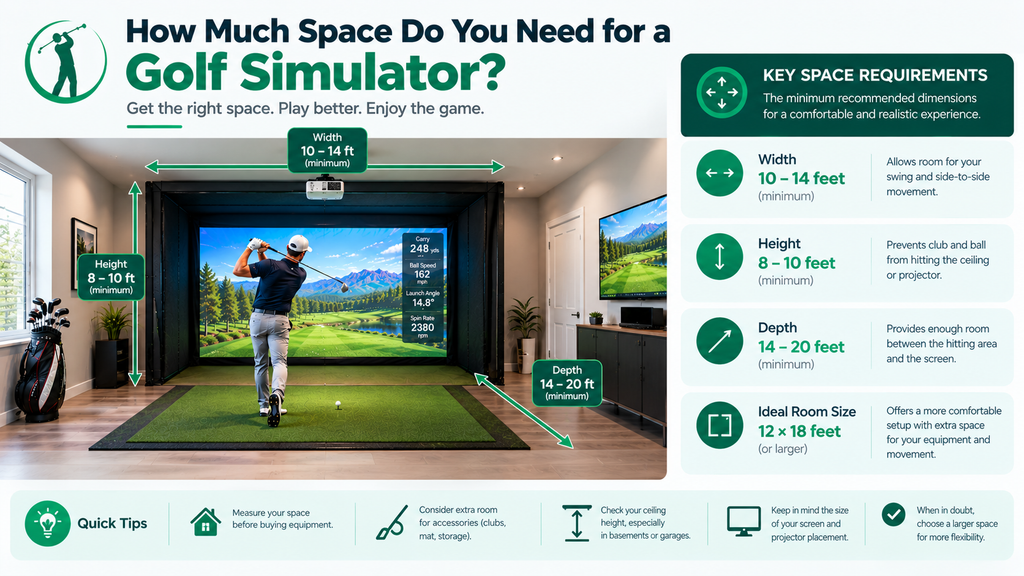
How much space do you need for a golf simulator? As a rule of thumb, a comfortable home golf simulator room is about 10 feet high, 15 feet wide and 18–20 feet deep. Many golfers make it work with less: roughly 9 feet high, 12 feet wide and 14–15 feet deep, especially with a camera launch monitor that sits beside the ball.
This guide gives you the golf simulator dimensions you need, then shows you how to measure your own room properly, work out the depth for your launch monitor, test your swing, and make a small room work. It’s part of our guide to an at home golf simulator setup.
Key Takeaways
- Ceiling height: 10 feet is comfortable for nearly everyone; 9 feet suits most golfers under 6 feet.
- Width: 12 feet minimum for one golfer with an offset setup; 14–16 feet to centre the hitting area for left- and right-handed golfers.
- Depth: about 14–15 feet minimum with camera launch monitors; 16–20 feet for most radar units.
- Ball to screen: typically 8–12 feet.
- Measure to the lowest obstruction, and test a real swing before buying.
Golf Simulator Room Dimensions at a Glance
| Dimension | Minimum (tight) | Recommended | Ideal |
|---|---|---|---|
| Ceiling height | 8.5 ft | 9–9.5 ft | 10 ft+ |
| Width | 10–12 ft | 12–14 ft | 15–16 ft |
| Depth (camera launch monitor) | About 13–14 ft | 15–17 ft | 18–20 ft |
| Depth (radar launch monitor) | About 16 ft | 18 ft | 20 ft+ |
These are general guides. Always check your launch monitor maker’s space requirements, as they differ between models.
How launch monitors change the space you need
| Launch monitor type | Where it sits | Space effect |
|---|---|---|
| Camera beside the ball | On the floor next to the ball | Needs the least depth; must move sides for left-handed golfers |
| Radar behind the ball | Several feet behind the golfer | Needs the most depth |
| Overhead (ceiling) | Mounted above the hitting area | Needs enough ceiling height to mount; keeps floor clear |
See the best golf simulators for every space, launch monitors compared and camera vs radar for specific models.
Golf simulator enclosure dimensions
Enclosures come in many sizes. Common home enclosures are roughly 10–16 feet wide and 8–10 feet tall, with side panels a few feet deep. Choose an enclosure that leaves clearance above it and beside it in your room, and check the maker’s recommended distance from the hitting area to the screen. See enclosure kits and DIY builds.
How to Measure Your Space for a Golf Simulator
Time: about 30 minutes. You’ll need: a tape measure (a laser measure is easier for ceilings), painter’s tape, a step ladder, your driver, a notepad and a helper.
- Choose the screen wall. Usually the shorter wall, so you hit along the room’s length. Avoid a wall with a window or door, or with one close beside it.
- Measure the full depth from the screen wall to the opposite wall, at floor level, along the line you’ll hit. Note anything that sticks out, such as a radiator, shelf or step.
- Measure the width of the room where you’ll stand, wall to wall, and note doors or windows on the side walls.
- Mark your hitting spot. Measure out from the screen wall: allow several inches to a foot for the gap behind the screen, plus 8–12 feet to the ball (your launch monitor’s manual may give an exact figure). Put a piece of tape on the floor.
- Measure the ceiling above that spot, not in the middle of the room: floor to the lowest beam, duct, light fitting, sprinkler head or garage door track within a few feet of where you’ll swing. Add an inch or two for the hitting mat. This is your real ceiling height.
- Do the swing test. Stand on the tape with your driver, the longest club anyone will use, and make slow, full swings while your helper watches the clubhead at the top and at the finish. Then do it with the tallest golfer in the house. Pass: several inches of clearance at slow speed. Fail: the club touches or nearly touches.
- Check the sides. Swing with your arms fully extended at hip height; nothing should be within reach. For left- and right-handed golfers, test both sides of the hitting spot.
- Check behind you. You need about 4–5 feet behind the ball for your stance and backswing, plus space for a radar unit if you use one (see the worksheet below).
- Write down all your numbers and compare them with the table above and your launch monitor’s requirements.
Depth worksheet
Add up the parts, working back from the screen wall:
| Part | Camera beside the ball | Radar behind the ball |
|---|---|---|
| Gap behind the screen | About 1 ft | About 1 ft |
| Ball to screen | 8–12 ft (e.g. 9 ft) | As the maker requires (e.g. 8–10 ft of ball flight) |
| Behind the ball | 4–5 ft for stance and backswing | The unit’s distance behind the ball (often 8 ft or more; check the manual) |
| Example total | 1 + 9 + 5 = 15 ft | 1 + 9 + 8 = 18 ft |
If your room is shorter than the total, choose a launch monitor that needs less depth, or move the ball closer to the screen within the maker’s allowed range.
Ceiling Height for a Golf Simulator
Ceiling height is usually the hardest dimension to change, so check it first. Your own height and swing decide how much you need:
| Golfer height | Minimum ceiling | Recommended ceiling |
|---|---|---|
| Under 5’8″ | 8.5 ft | 9 ft |
| 5’8″–6’0″ | 9 ft | 9.5–10 ft |
| 6’0″–6’4″ | 9.5 ft | 10–10.5 ft |
| Over 6’4″ | 10 ft | 10.5–11 ft |
These are starting points; a flat swing needs less height and an upright one more, which is why the swing test matters. For 8-foot ceilings, vaulted ceilings and more on testing your swing, see how high a ceiling you need for a golf simulator.
Golf simulators with vaulted ceilings
A vaulted or sloped ceiling can work well. Put the hitting area under the highest part, so you have the most headroom where you swing, and check the lower sides don’t come into your swing arc.
Room Width and Depth
Ceiling height gets the most attention, but width and depth decide whether the swing, the launch monitor and the screen all fit.
Room width
Width decides whether you can swing freely and whether left- and right-handed golfers can share the setup.
- Offset hitting area (one-handed setups): stand to one side of the room’s centre, with at least 4–5 feet behind you for your backswing. About 10–12 feet of width can work.
- Centred hitting area: lets both left- and right-handed golfers play without moving anything. Allow about 14–16 feet.
Leave a little space each side of the enclosure for access and to fit side netting.
Room depth
Depth is made up of three parts:
- Behind the screen: several inches to a foot between the screen and the wall, so balls don’t hit the wall.
- Ball to screen: typically 8–12 feet. Closer increases bounce-back and can make the picture feel cramped; further uses up depth.
- Behind the ball: about 4–5 feet for your stance and backswing, more for radar launch monitors, which sit several feet behind you.
Add those up and you get roughly 14–15 feet with a camera launch monitor and 16–20 feet with most radar units.
Golf Simulator Room Layout
A golf simulator room is any space set up for indoor golf: a dedicated room, part of a garage or basement, or a corner of a larger room. Lay it out in this order:
- Screen on the shortest wall, so you hit along the room’s length.
- Hitting mat centred or offset, at the right distance from the screen.
- Launch monitor placed as its maker specifies.
- Projector out of the swing path, usually ceiling-mounted; see projector setup.
- Seating, PC and storage behind the hitting area, out of range of the club.
For layouts, lighting and decor, see golf simulator room design ideas, and for the practical setup see our garage and basement setup guide.
Space for spectators, seating and equipment
If friends and family will watch, add room behind the golfer for seating: at least 4–6 feet behind the swing area, more for a sofa or bar. Allow space for the PC, a small table, club storage and a walkway that doesn’t cross the hitting area. A dedicated room of around 15 x 25 feet comfortably fits a bay and a seating area.
How to Make a Small Room Work: Step by Step
If your measurements come out short, work through these steps in order; each one buys back space.
- Short on depth? Choose a camera launch monitor that sits beside the ball rather than a radar unit behind you, and set the ball at the shorter end of the maker’s allowed distance from the screen.
- Short on width? Offset the hitting area to one side, so your backswing has the most room. Left- and right-handed golfers will need to move, so check the space on both sides.
- Short on height? Move the hitting spot under the highest point (between joists, away from ducts), use a lower-profile mat, and avoid ceiling-mounted launch monitors.
- Still tight with the driver? Accept limits: irons, wedges and short-game practice indoors, driver on the range. Many owners are happy with this.
- Need the room for other things? Use a retractable screen and a mat you can move, so the room still works as an office, guest room or garage.
- Too small for a projected picture? Start with a net and a launch monitor that shows shots on a tablet or TV, and upgrade later.
See also the minimum room for a golf simulator and whether a 12×12 room is big enough.
Living room golf simulators
A living room simulator is possible with a long room, a launch monitor that sits beside the ball, and a retractable screen. Think about furniture, windows, light fittings and other people’s tolerance for noise.
Dimensions Needed: Three Worked Examples
Example 1: 14 x 16 ft spare room, 9 ft ceiling, golfer 5’10”
Ceiling: fine for most swings; test the driver. Width: 14 feet allows a centred bay. Depth: 16 feet works with a camera launch monitor beside the ball, with the ball about 9 feet from the screen. A radar unit would be tight. Verdict: works well with a camera unit.
Example 2: 20 x 20 ft two-car garage, 9.5 ft ceiling (8.5 ft under the door opener), golfer 6’2″
Ceiling: the open ceiling is fine, but the area under the opener isn’t, so set up at the back of the garage, away from the door mechanism. Width and depth: plenty for any launch monitor. Verdict: works well, with the bay placed away from the door.
Example 3: 12 x 12 ft room, 8 ft ceiling, golfer 5’7″
Ceiling: tight; full driver swings may not fit. Width: an offset bay works. Depth: 12 feet is short even for a camera unit, leaving only about 7 feet from ball to screen. Verdict: possible for irons and short-game practice with a net and a camera unit, but not a comfortable full simulator. See whether a 12×12 room is big enough.
Not sure your room works? A local golf simulator installer can assess it, often as part of a free quote.
FAQ
How much space do you need for a golf simulator?
A comfortable room is about 10 feet high, 15 feet wide and 18–20 feet deep. A tighter setup can work with about 9 feet high, 12 feet wide and 14–15 feet deep, especially with a camera launch monitor.
How do I measure my room for a golf simulator?
Measure depth from the screen wall, width where you’ll stand, and the ceiling at the lowest point above your hitting spot. Then swing a driver slowly at that spot and add up the depth for your launch monitor: gap behind the screen, ball-to-screen distance and space behind the ball.
What is the minimum ceiling height for a golf simulator?
About 8.5 feet for shorter golfers and 9 feet for most adults. Ten feet is comfortable for nearly everyone.
How wide does a golf simulator room need to be?
About 10–12 feet with an offset hitting area for one golfer, and 14–16 feet to centre the hitting area so left- and right-handed golfers can share it.
How far should you stand from a golf simulator screen?
The ball is typically 8–12 feet from the screen. Check your launch monitor and screen makers’ recommendations.
What is the best golf simulator for a small space?
A camera-based launch monitor that sits beside the ball, as it needs the least room depth. Overhead units also save floor space but need enough ceiling height to mount.