
Guide
Entry-Level Golf Simulators: Golf Daddy, OptiShot 2, Square Golf and No-Ball Options
Swinglix may earn a commission when you buy through links on this page, at no extra cost to you. Learn more
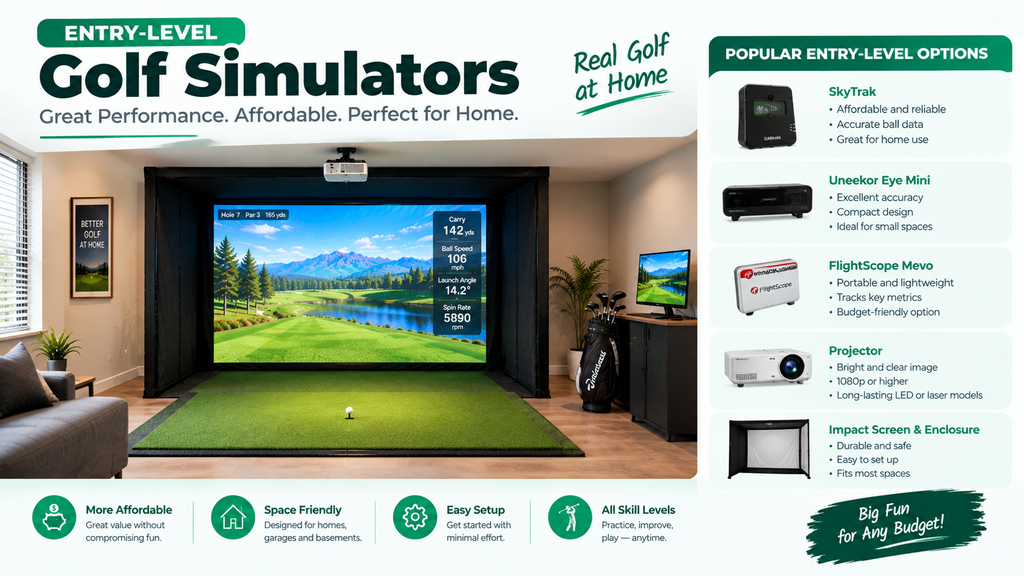
Entry-level golf simulators cost from about $100 to $1,600, but they work in very different ways. Some, like the Golf Daddy simulator (about $99) and OptiShot 2 (about $299–$499), measure your swing or the club without tracking a real ball in flight. Others, like the Square Golf launch monitor ($699.99), are true camera launch monitors that measure the ball, just at a budget price.
This guide explains each option honestly: how it works, what it can and can’t do, and who it suits. It is part of our best golf simulator launch monitor guide.
Key Takeaways
- Golf Daddy: about $99; a pressure-sensing mat and phone-camera app that estimate ball flight from your swing. No ball needed; fun, but not a launch monitor.
- OptiShot 2: about $299–$499; an infrared swing pad that reads the club, sold as “Golf in a Box” with net, mat and software.
- Square Golf: $699.99; a camera launch monitor with ball and club data and no subscription fee. The Omni model costs about $1,599.
- Phigolf and similar: motion sensors on a club or stick that play golf games on your phone or TV.
- For accurate ball flight, choose a real launch monitor such as Square Golf, Garmin R10 or Rapsodo MLM2PRO.
Entry-Level Golf Simulators Compared
| Option | Typical price | What it measures | Real ball? | Best for |
|---|---|---|---|---|
| Golf Daddy | About $99 | Swing and impact via mat + phone camera; AI estimates flight | No | Casual swing practice, gifts |
| OptiShot 2 | About $299–$499 | Club speed, path and face via infrared sensors | Optional (foam or real into a net) | Family fun, tempo |
| Phigolf-style sensors | Budget | Club or swing-stick motion | No | Golf gaming, tiny spaces |
| Square Golf | $699.99 | Ball (and club) by camera | Yes | Budget real simulator, no subscription |
| Square Golf Omni | About $1,599 | Four cameras, built-in display, 15 parameters including impact location | Yes | Step up with no subscription |
Entry-level simulator pros and cons
| Option | Pros | Cons |
|---|---|---|
| Golf Daddy | Cheapest; no ball, no net needed | Estimates shots; not a launch monitor |
| OptiShot 2 | Complete kit; family fun | Reads the club, not the ball; needs a Windows PC |
| Square Golf | Real ball data; no subscription fee; works with GSPro, E6, Awesome Golf | Costs more than no-ball options |
| Phigolf-style sensors | Tiny space, golf gaming | Game rather than practice tool |
Golf Daddy Golf Simulator
The Golf Daddy, also sold as “Golf At Home Simulator”, costs about $99 and is sold at retailers including Dick’s Sporting Goods and Golf Galaxy. It pairs a pressure-sensing mat with a smartphone app that uses your phone’s camera and AI to analyse your swing and impact, then estimates the ball flight. You swing a real club over the mat without hitting a ball, and the app shows the shot; it can also be shown on a TV. Recent updates added hands-free swing detection.
How accurate is Golf Daddy?
Because it estimates the shot from your swing rather than measuring a ball in flight, it isn’t a launch monitor and can’t match the accuracy of devices that track the ball. Reviewers generally describe it as a budget swing trainer that is fun and convenient, with clear limits on accuracy.
Golf Daddy vs a real simulator
Golf Daddy is ideal if you want to swing indoors without a net, can’t hit balls where you live, or want a low-cost gift. If you want realistic ball flight and numbers you can trust, look at Square Golf, the Garmin R10 or the Rapsodo MLM2PRO. Comparing Golf Daddy with something like TrackMan isn’t really like-for-like: they are different kinds of product.
OptiShot 2 Golf Simulator
OptiShot 2 is an infrared swing pad: sensors in the pad read the clubhead as it passes over, measuring club speed, path and face angle, and the software estimates the shot. It is usually sold as “Golf in a Box” with a net, hitting mat, foam practice balls and software with 15 courses, and runs on a Windows computer. You can hit real balls into the net or use foam balls.
Pros: cheap, compact, fun for families, works in small rooms. Cons: doesn’t measure the ball, so spin and real ball flight aren’t captured; mishits that a real launch monitor would show may look better than they were.
Square Golf Launch Monitor
Square Golf makes compact camera-based launch monitors that sit beside the ball and measure the real ball. In 2026 the standard Square Golf launch monitor sells for about $699.99, and authorised retailers describe it as tracking ball and club data with no subscription. It works with third-party software including GSPro, E6 and Awesome Golf, and Square Golf’s own platform uses a pay-as-you-go credit model rather than a monthly fee (the company advertises 1,000 free credits). The Square Golf Omni, at about $1,599, adds four high-speed cameras, a built-in display and 15 tracked parameters including impact location.
How accurate is the Square Golf launch monitor?
As a camera unit that measures the ball at impact, it is in a different league from no-ball trainers, and owners generally rate it well for the price. Premium launch monitors measure more, and more consistently, but Square Golf is a credible budget choice for real simulator play.
Square Golf setup and how-tos
- Setting up: place it beside the ball on a flat surface at the distance Square Golf specifies, facing the target line.
- Aligning: use the app’s alignment process (and any alignment stick supplied) to square the unit to your target.
- Updating: keep the app and firmware updated through Square Golf’s app.
- Credits: check Square Golf’s app for how credits work and how many you get.
Square Golf’s support pages have step-by-step guides for each model.
Phigolf, No-Ball Simulators and Budget Brands
Below the dedicated launch monitors sits a group of cheaper options. Here is what each can and can’t do.
Phigolf and swing-sensor simulators
Phigolf-style products attach a motion sensor to a short swing stick or your own club and turn your swing into a golf game on a phone, tablet or TV. They need very little space and no ball, which makes them popular in apartments and as gifts. They are games and swing trainers rather than launch monitors.
“No ball” golf simulators: good or bad?
Simulators that work without hitting a ball are great for:
- apartments and rooms where hitting balls isn’t possible;
- quick swing practice without setting up a net;
- children and family games.
They aren’t suitable if you want accurate distances, spin and ball flight, because they never see the ball. For that, you need a launch monitor.
Nets, cages and budget simulator brands on Amazon
Brands such as ZealFeel, Zivplay and ZStrict, sold on marketplaces like Amazon, mainly offer budget golf nets, practice cages and impact screens rather than launch monitors. They can be a low-cost way to build the hitting area around a budget launch monitor; read reviews carefully and check net strength and size. See golf simulator nets and cheap golf simulators.
Which Entry-Level Option Should You Choose?
| If you want… | Choose | Check first |
|---|---|---|
| To swing without hitting balls (apartments, small rooms) | Golf Daddy or a Phigolf-style swing sensor | These read the swing, not a real ball, so shots are less realistic |
| A cheap, all-in-one family kit | OptiShot 2 Golf in a Box | A swing pad that reads the club; fun more than accurate |
| Real ball data in a short room, no subscription | Square Golf | Camera beside the ball; check its credits model for courses |
| A budget unit for the range and home | Garmin R10 or Rapsodo MLM2PRO | Radar behind the ball needs room depth; check membership costs |
How to decide in three steps
- Do you need to hit real balls? If not (no space, noise limits), choose a swing sensor or a swing-pad kit. If yes, continue.
- How deep is your space? Short rooms suit a camera unit beside the ball; deeper rooms and outdoor use suit radar units behind the ball.
- What will it cost over three to five years? Compare the price plus any membership; a unit with no subscription can work out cheaper.
Planning to upgrade later? Choose a unit that works with the software you’d eventually want, and a net or enclosure big enough to add an impact screen. For complete budget setups, see the cheap golf simulator guide.
Upgrade path: from no-ball trainer to real simulator
- Start: Golf Daddy or OptiShot to see how much you’ll use it.
- First real launch monitor: Square Golf, Garmin R10 or Rapsodo MLM2PRO with a net.
- Full simulator: a mid-range camera unit, enclosure, impact screen and projector.
Each step keeps something useful: the net and mat carry over, and practice habits stay with you. See how to build a home golf simulator.
Golf Daddy Simulator Reviews and Ratings: What Reviewers Say
Reviews of the Golf Daddy from golf sites and buyers tend to agree on the basics: it is cheap, easy to set up and fun, and it lets you swing indoors without hitting a ball. Most reviewers also stress its limits: it estimates the shot rather than measuring a ball, so it isn’t a substitute for a launch monitor for accurate distances and spin. Reviews from 2024 and 2025 may not cover newer app features such as hands-free swing detection, so check recent reviews. (It is sometimes misspelled “GoDaddy” in searches.)
FAQ
How does the Golf Daddy simulator work?
It pairs a pressure-sensing mat with a smartphone app. You swing over the mat without a ball, and the app uses your phone’s camera and AI to estimate the shot.
Is OptiShot 2 a good golf simulator?
It is good value for family fun and swing practice, but it reads the club rather than the ball, so it isn’t accurate for real ball flight and spin.
Is Square Golf accurate?
As a camera launch monitor that measures the real ball, it is far more accurate than no-ball trainers, and well regarded for its price.
Can you have a golf simulator without a ball?
Yes: products like Golf Daddy, OptiShot (with foam balls) and Phigolf work without real balls, but they estimate the shot rather than measure it.
What are good alternatives to Golf Daddy?
OptiShot 2 and Phigolf-style sensors for no-ball play, or Square Golf, Garmin R10 and Rapsodo MLM2PRO if you want a real launch monitor.