
The first time you step into a modern golf simulator, the experience can feel borderline sci-fi. You hit a real ball into a screen eight feet away, and somehow the system knows your ball speed, spin rate, launch angle, and precisely where your shot would land on Pebble Beach’s 18th hole. The technology seems like magic—until you understand how it actually works.
Golf simulators have transformed from novelty devices into legitimate training tools over the past decade. The 2025 Masters Champion uses both TrackMan and the Foresight GCQuad for his simulator practice sessions both at home and on the driving ranges at PGA Tour events. What tour professionals rely on for tournament preparation is now accessible to everyday golfers who want year-round practice and game improvement.
This guide breaks down everything you need to understand about golf simulator technology, how different systems compare, what separates budget options from premium setups, and which configuration makes sense for your space, budget, and goals.
Key Takeaways
- Golf simulators work by analyzing data from your shot including ball speed, spin, and launch angle using radar, cameras, infrared sensors, or sensor mats, then determining where your ball will go and simulating it on a screen
- Modern systems combine radar for primary ball tracking while cameras provide visual verification and enhanced club analysis, delivering accuracy that rivals professional facilities
- Radar systems like TrackMan directly measure ball velocity using the Doppler effect and typically provide the most accurate data points, while photometric systems excel at detailed club and impact data
- Based on outdoor testing, launch monitor carry distance data tends to be within 5% of actual real-life distance, with accuracy varying by environment and technology type
- Complete simulator costs range from around $1,000 to $50,000, with the biggest factors being tracking technology quality and overall room setup
- Space requirements vary significantly—radar systems need 14-16 feet depth, photometric units need less depth but specific positioning, overhead systems require ceiling mounting at 9+ feet
What is a Golf Simulator?

Golf simulators are arguably the highest-tech devices in the sport, using cameras, sensors, and radar technology to analyze data from each shot while helping golfers identify areas for improvement. Indoor golf uses cameras, sensors, and software to recreate golf courses and record your shots inside a room, with systems showing ball flight, distance, spin, and more on a big screen.
At the heart of every golf simulator is a piece of technology measuring the initial flight of the golf ball to accurately represent the full flight, which then connects with golf simulation software. The software can be projected onto a hitting screen or viewed on a separate monitor while balls are hit into a net.
The experience combines several elements working in harmony:
Launch monitor technology captures ball and club data at the moment of impact and immediately following. This includes measurements like ball speed (how fast the ball leaves the clubface), launch angle (vertical angle at which the ball takes off), spin rate (revolutions per minute), and carry distance (how far the ball travels in the air).
Simulation software takes that data and calculates the complete ball flight using physics engines and algorithms. The software knows how wind, elevation, temperature, and course conditions would affect your shot. It renders the ball flight visually on virtual representations of real golf courses.
Display systems project the simulation onto impact screens or show it on monitors, creating the visual element that makes the experience feel like playing real golf rather than just hitting balls into a net with numbers on a screen.
Impact screens or nets safely stop the golf balls and, in the case of screens, provide the projection surface for the visual simulation.
How Golf Simulators Actually Work
Once your ball is placed correctly, simply make your swing—the simulator analyzes a large amount of data produced from your golf shot, and once it has this data the simulator will determine where your ball will go and simulate your shot on a screen in real time.
The process happens in milliseconds:
Impact detection: The system recognizes when you’ve struck the ball. This triggers data capture systems to begin measuring.
Data collection: In the milliseconds following contact when the club hits the ball, raw sensor data transforms into actionable feedback as modern golf simulators process dozens of parameters simultaneously. The launch monitor captures ball speed, spin rates, launch angles, and club data depending on the system’s capabilities.
Ball flight calculation: This real-time analysis enables predictive ball flight modeling that accurately simulates where your shot would land on an actual course. The software applies physics calculations accounting for spin, drag, lift, and gravity to determine the complete trajectory.
Visual rendering: The simulation software displays your ball flight on the projected course, showing the ball’s arc, landing location, and roll. The best golf simulators not only enable golfers to practice in their own virtual driving range but also provide the chance to play an array of virtual courses whilst receiving real-time feedback.
Performance feedback: After your shot, the system displays detailed data about what happened. Depending on your launch monitor, this might include 8-10 basic metrics or 40+ advanced parameters.
Understanding Launch Monitor Technology
A launch monitor is a system that analyzes various measurements during a golf shot, capturing things like ball speed, spin, launch angle, carry, flight path, and club path. Golf simulators then take all the data provided by a launch monitor and use it to accurately simulate the shot on a virtual golf course.
Launch monitors represent the most critical component of any simulator setup. Everything else—software, screens, projectors—depends on the launch monitor providing accurate data about what happened during your swing.
The Launch Monitor vs. Simulator Distinction
Manufacturers like SkyTrak, Foresight, FlightScope, or TrackMan are typically thought of as launch monitors first but also have the ability to incorporate simulation software, whereas golf simulator brands such as Golfzon are strictly golf simulators typically sold as one complete package including everything you need.
This distinction matters when shopping. Launch monitors from companies like TrackMan and Foresight are standalone devices you can use outdoors, at the range, or as part of a home simulator. They’re sold separately and you build your simulator around them.
Complete simulator packages from companies like Golfzon or HD Golf include proprietary launch monitor technology as part of an integrated system. These packages provide everything at once but don’t offer the flexibility of using the tracking device independently.
Radar vs. Camera Technology: The Core Comparison
The tracking technology your simulator uses affects everything—accuracy, setup requirements, space needs, and price. Understanding the differences helps you choose the right system for your situation.
Radar-Based Launch Monitors
Radar-based systems formally called “Doppler Radar” work by emitting radar signals from the sensor that bounce off the golf ball, with return signals analyzed to see the change in signals over time to calculate multiple data points including ball speed, launch angle, launch direction, and spin rate.
Radar systems directly measure the velocity of the golf ball using the Doppler effect—when radar waves bounce off the moving ball, the frequency of returned waves changes based on ball speed, providing precise real-time data on velocity for accurate calculation of parameters like ball speed and spin rate.
Advantages of radar systems:
Radar-based systems typically have higher sampling rates compared to camera-based systems, with higher rates providing more data points during ball flight leading to greater accuracy in calculating launch angle, spin rate, and other parameters.
Radar systems are unmatched in terms of tracking ball carry and total distance, typically achieving accuracy within 2-3% of actual values in optimal conditions, and as they can measure the ball throughout its flight, analyzing shot dispersion and landing angles is easy and fast.
In general, a radar-based system will be easier to use and setup—while it’s important to place a radar system the correct distance behind the ball, there is not much more to setup.
Radar systems work in any lighting condition. Direct sunlight, cloudy days, indoor lighting, or darkness—radar doesn’t care. This makes them particularly valuable for outdoor use or in spaces with variable lighting.
Limitations of radar systems:
Radar systems can be affected by external and environmental factors—surrounding or nearby metal objects, fluorescent lighting, and rotating fans may interfere with data readings, which must be carefully considered when setting up your home golf simulation system.
Items around the launch monitor or hitting area that could interfere with radar readings include appliances with fans and other electronic factors.
Radar systems typically require more space behind the ball—usually 6-10 feet—to properly track ball flight. This depth requirement affects room dimensions and setup flexibility.
Popular radar systems: TrackMan 4, TrackMan iO, FlightScope Mevo+, Garmin Approach R10, Full Swing KIT, Voice Caddie SC4 Pro.
Camera-Based (Photometric) Launch Monitors
Camera-based systems, more formally called “photometric” systems, work by taking hundreds of photos per second using high-speed cameras that are fed through various computer vision algorithms to calculate multiple data points including ball speed, launch angle, launch direction, and spin rate.
Camera-based systems including those from Foresight and Uneekor use high-speed photometric technology to capture thousands of images per second at the moment of impact.
Advantages of camera systems:
Camera-based systems excel in measuring club data and impact dynamics, being particularly adept at providing real-time information about what happens at the moment of impact, making them invaluable for swing analysis.
Photometric systems can capture the movement of the golf club and clubhead during impact in detail, allowing for more realistic graphics and animations in virtual golf simulation, helping create a more immersive and engaging experience.
These systems typically mount adjacent to or above the hitting area, requiring significantly less space than their radar counterparts. This space efficiency makes photometric systems excellent for tighter rooms or basements with limited depth.
Camera launch monitors tend to perform better than radar-based systems for putting accuracy, as they can record the starting speed, launch angle, and spin rates of a putt in just the same way as a normal golf shot.
Limitations of camera systems:
Photometric launch monitors perform well in normal indoor lighting, but if your golf simulator room is dark, using a spotlight to illuminate the hitting area helps the launch monitor see the ball, while direct sunlight might be too bright for cameras to handle.
With photometric systems, there is often a lengthier calibration process which may include ensuring appropriate lighting on the ball and placing the launch monitor in the perfect spot next to the ball.
Some camera systems require marked balls or stickers on clubs for optimal tracking, adding ongoing costs and setup complexity.
Popular camera systems: Foresight GCQuad, Foresight GC3, Bushnell Launch Pro, SkyTrak+, Uneekor EYE series, Foresight GCHawk.
Hybrid Systems: Best of Both Worlds
Many premium indoor golf simulator systems now combine both technologies, using radar for primary ball tracking whilst cameras provide visual verification and enhanced club analysis.
The FlightScope Mevo+ uses Fusion Tracking Technology combining 3D Doppler radar and synchronized image processing for unmatched tracking accuracy. The SkyTrak ST MAX continues SkyTrak’s hybrid sensing approach using dual Doppler radar plus photometric cameras to capture both ball and club metrics with high reliability for indoor sim play.
Hybrid approaches leverage radar’s strengths for speed and club path vectors while using cameras for spin and launch detail. Together they improve robustness across different swings and ball types.
Comparing Accuracy Across Technologies
Top-tier launch monitors are highly accurate, while lower-cost options are improving quickly—if you need tour-level accuracy, compare radar vs photometric systems and look for third-party tests.
Based on outdoor testing, the carry distance data that launch monitors provide tends to be within 5% of the actual real-life carry distance measured by a rangefinder, though accuracy can be environment dependent.
Professional-grade systems (TrackMan 4, Foresight GCQuad, TrackMan iO):
- Ball speed: ±0.5-1 mph accuracy
- Carry distance: ±1-2 yards accuracy
- Launch angle: ±0.5 degrees accuracy
- Spin rate: ±50-100 rpm accuracy
Mid-range systems (SkyTrak+, FlightScope Mevo+, Bushnell Launch Pro):
- Ball speed: ±1-2 mph accuracy
- Carry distance: ±2-4 yards accuracy
- Launch angle: ±1 degree accuracy
- Spin rate: ±100-200 rpm accuracy
Budget systems (Garmin R10, Rapsodo MLM2PRO, Voice Caddie SC4 Pro):
- Ball speed: ±2-3 mph accuracy
- Carry distance: ±3-6 yards accuracy
- Launch angle: ±1-2 degrees accuracy
- Spin rate: ±200-400 rpm accuracy (often calculated rather than directly measured)
In testing, most launch monitors are consistently within 7% of real-life numbers, with specific accuracy varying by launch monitor and environmental factors.
The key question: How much accuracy do you actually need? For general practice and game improvement, mid-range accuracy proves sufficient. For club fitting and professional instruction, premium accuracy becomes essential. For casual entertainment, budget systems deliver perfectly acceptable experiences.
Essential Simulator Components
To run a golf simulator you need a few important pieces of equipment as well as a good space to make a full swing. Here’s what comprises a complete setup:
1. Launch Monitor (The Brain)
The tracking device that captures shot data. Prices range from $500-$25,000 depending on technology and features. This represents your largest single investment and most important decision.
2. Simulation Software (The Experience)
The computer program or app that shows your simulated ball flight on simulated driving ranges, golf courses, or in games and skill-building challenges, depending on the software.
Popular options include:
- E6 Connect: Licensed courses, excellent graphics, subscription-based ($300-600 annually)
- GSPro: Stunning visuals, growing course library, one-time purchase (~$700)
- TGC 2019: 100,000+ user-created courses, realistic graphics, one-time purchase ($700-900)
- Manufacturer software: Many launch monitors include proprietary software (TrackMan Virtual Golf, FSX from Foresight, SkyTrak Course Play)
3. Impact Screen or Net
The screen that you hit the golf ball into and that displays the projected image of your simulation software.
Impact screens for projection: $400-$2,000 depending on size and material. Quality screens maintain tension, resist tears, and provide crisp projection surfaces.
Golf nets for non-projection setups: $100-$500. These work fine if you’re viewing simulation on a computer monitor rather than projected image.
4. Projector (For Projected Setups)
Short-throw projectors work best for simulator spaces. You need:
- 3,000+ lumens brightness for daylight-visible images
- 1080p minimum resolution (4K preferred for premium setups)
- Short throw ratio to minimize shadows
- Budget $800-$4,000 depending on quality
5. Hitting Mat
A piece of artificial turf that you strike the ball from, with the golfer typically also standing on the hitting mat though it can be a simple strip of turf for the ball to sit on.
Quality mats ($200-$2,000) protect your joints during extended practice while providing realistic turf interaction. Cheap mats hurt wrists and provide poor feedback—don’t skimp here.
6. Computer
Modern simulation software demands processing power. Requirements vary by software:
- Basic data viewing: Any recent laptop or tablet
- 3D simulation software: Gaming PC with dedicated graphics card (GTX 1660 or better)
- 4K simulation with high-end graphics: Premium gaming PC (RTX 4070 or better)
- Budget $500-$3,000 depending on simulation needs
7. Enclosure and Netting
Side netting and ceiling protection prevent errant shots from damaging your space. Complete enclosures contain everything within a defined bay.
Costs range from $200 (basic nets) to $5,000 (professional enclosures with custom fitting).
Space Requirements by System Type
Space requirements depend significantly on your chosen system, with ceiling heights of 2.6-2.8 meters (8.5-9.2 feet) accommodating most golfers comfortably whilst room dimensions should allow for natural swing mechanics.
Minimum Viable Simulator Space
Width: 10 feet minimum (12-15 feet comfortable) Depth: Varies by technology—
- Radar systems: 14-16 feet total (6-8 feet behind ball + ball position + 7-8 feet to screen)
- Photometric systems: 10-12 feet total (positioned beside hitting area)
- Overhead systems: 10-12 feet total (no floor space behind ball needed)
Height: 9 feet minimum for most golfers, 10+ feet for taller players or those with upright swings
Comfortable Single-Bay Setup
Width: 12-15 feet Depth: 12-14 feet Height: 9-10 feet
This accommodates full swings with all clubs without restriction.
Premium Multi-Bay Installation
Width: 16+ feet per bay Depth: 14-16 feet Height: 10-12 feet
Professional facilities and luxury home installations with multiple users and seating areas.
Garage Conversions
Garages work excellent for simulators, though cold winters require consideration for insulation and climate control. Two-car garages (typically 18-20 feet wide) provide ideal dimensions. Single-car garages (10-12 feet wide) work but feel constrained.
Budget Tiers and What You Get
The cost of a golf simulator including necessary equipment can range anywhere from around $1,000 all the way up to $50,000, with one of the biggest factors in cost being the overall technology used.
Under $1,000: Entry-Level Launch Monitors
What you get: Basic launch monitors (Garmin R10 $600, OptiShot 2 $400-500) that measure limited data points. Typically hit into nets with simulation viewed on phones or tablets.
Best for: Casual golfers wanting winter practice, families seeking golf entertainment, or testing simulator interest before heavy investment.
$1,000-$3,000: Budget Simulators
What you get: Quality launch monitors with decent accuracy (Rapsodo MLM2PRO $700, Voice Caddie SC4 Pro $600, SkyTrak $2,000-2,500). Add basic nets, mats, and software subscriptions.
Best for: Serious recreational golfers wanting meaningful practice data without premium pricing.
$3,000-$8,000: Mid-Range Sweet Spot
What you get: Excellent launch monitors (SkyTrak+ $3,000, FlightScope Mevo+ $2,200-3,200, Bushnell Launch Pro $2,000-3,500) plus quality screens, projectors, and complete software access.
Best for: Single-digit handicappers, teaching pros, or dedicated golfers building permanent home setups.
$8,000-$20,000: Premium Home Systems
What you get: Professional-grade launch monitors (Foresight GC3 $7,000-9,000, Uneekor EYE XO $4,500-5,500, Full Swing KIT $7,000-9,000) with premium enclosures, 4K projection, and professional installation.
Best for: Serious amateurs, club fitters, or luxury home installations.
$20,000-$50,000+: Professional/Commercial
What you get: Top-tier systems (Foresight GCQuad $15,000-18,000, TrackMan 4 $21,000+, TrackMan iO $14,000+) with commercial-grade enclosures, multiple bays, and complete room buildouts.
Best for: Teaching facilities, commercial golf lounges, country clubs, or affluent golfers wanting the absolute best.
Technology Trends
Artificial intelligence is set to become a major player in the golf simulator industry, with systems getting smarter and offering insights that go far beyond basic metrics to help golfers understand and improve their game.
AI-Powered Analysis
AI-powered simulators can now provide instant analysis of your swing breaking it down into actionable insights, identifying areas for improvement and offering suggestions that can be applied right away, while using data from sessions to create personalized training programs tailored to specific needs.
The SkyTrak ST MAX includes native speed-training content in partnership with GOLFTEC, with guided speed programs created by coaches featuring structured drills, measurable checkpoints, and real-time feedback so you can train with purpose.
Multi-Sport Functionality
Golf simulators are no longer limited to just one sport—in 2025 expect systems that double as entertainment hubs for a variety of activities including soccer, baseball, and even cricket, with seamless mode switching offering endless entertainment options.
Cloud Integration and Global Competition
Golf simulators are becoming more connected than ever with integration with cloud technology meaning users can store data, track progress, and compete with players worldwide, allowing you to see where you rank against other golfers from around the globe.
Compact and Retractable Designs
As simulators become more popular in homes, manufacturers focus on space-saving solutions. Retractable screens, folding enclosures, and ceiling-mounted systems address the reality that most people can’t dedicate entire rooms exclusively to golf.
Comparing Popular Systems Side-by-Side
Budget Category ($500-$1,000)
Garmin R10

- This Bundle Contains: 1 Garmin Approach R10, Portable Golf Launch Monitor, Take Your Game Home, Indoors or to The Drivin…
- Work to improve your game at home, indoors or on the driving range with a portable launch monitor. Track key metrics whe…
- Enjoy more time on the range with up to 10 hours of battery life. Understand your golf strengths and areas for improveme…
- Technology: Radar
- Data points: 14
- Portability: Excellent (5.22 oz)
- Battery: 10 hours
- Best use: Outdoor/indoor flexibility
Rapsodo MLM2PRO ($700)

- Advanced Golf Launch Monitor – The Rapsodo MLM2PRO golf launch monitor delivers pro-level accuracy, measuring 13 core go…
- Golf Simulators for Home & Practice – Pair this mobile launch monitor with your smartphone or tablet to transform any sp…
- Ultimate Golf Tracker & Swing Analyzer – Get real-time data on ball speed, club speed, and launch angle with this cuttin…
- Technology: Dual cameras + radar
- Data points: 13+
- Portability: Good
- Subscription: $199/year (Premium)
- Best use: Video analysis enthusiasts
Voice Caddie SC4 Pro

- PRO-GRADE ACCURACY WITH SC4 PRO: Experience unmatched precision with the SC4 PRO’s ProMetrics Engine, providing real-tim…
- ENHANCED SETUP WITH ADJUSTABLE ALIGNMENT STAND: Designed for the SC4 PRO, the adjustable alignment stand ensures accurat…
- ADVANCED METRICS AND INSIGHTS VIA VOICECADDIE S APP: Unlock comprehensive swing data via the VOICECADDIE S App, includin…
- Technology: Doppler radar
- Built-in display: Yes
- Subscription: None required
- Best use: Range practice
Mid-Range Category ($2,000-$4,000)
SkyTrak+

- Ultimate Golf Simulation Experience: SkyTrak+ delivers advanced club data—Club Head Speed, Smash Factor, Club Path, and …
- Personalize your improvement journey.
- Award-Winning Launch Monitor: Recognized by Golf Digest, Golf Monthly, and Today’s Golfer, SkyTrak+ is the editor’s choi…
- Technology: Hybrid (radar + camera)
- Accuracy: Professional-grade
- Software: Excellent native options
- Best use: Serious home simulators
FlightScope Mevo+
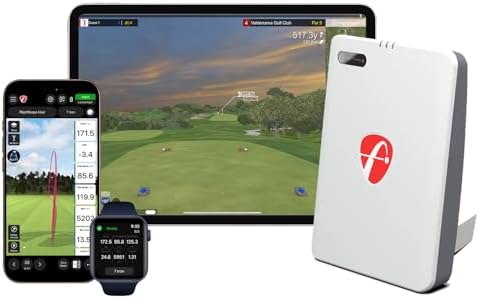
- FLIGHTSCOPE PORTABLE LAUNCH MONITOR AND SIMULATOR: The FlightScope Mevo Gen2 launch monitor and simulator that uses pate…
- PRACTICE WITH PURPOSE: Dial In Your Distance with 18 Full Swing, Chipping and Putting Data Parameters. Bring to the rang…
- AS SEEN ON TV FLIGHTSCOPE TRACER: Witness the full flight path of your ball, from launch to landing, rendered in stunnin…
- Technology: Fusion Tracking (radar + imaging)
- Data points: 40+ (with upgrades)
- Portability: Excellent
- Best use: Indoor/outdoor versatility
Bushnell Launch Pro

- Tour-Caliber Accuracy for Ball + Club Data: Capture spin, launch angle, carry, club path, angle of attack, and more with…
- True-to-Life Golf Simulation: Practice indoors or out with industry-best simulator functionality. Compatible with FSX, E…
- Indoor + Outdoor Versatility: Use in your garage, simulator bay, or range tee. Rugged design with a touchscreen display …
- Technology: Photometric (same as GC3)
- Accuracy: Professional-grade
- Subscription: Required for simulation
- Best use: Ultimate accuracy at budget pricing
Premium Category ($7,000-$20,000)
Foresight GCQuad ($15,000-18,000)
- Technology: Quadrascopic (4 cameras)
- Accuracy: Industry standard
- Portability: Excellent
- Best use: Professionals and serious amateurs
TrackMan iO ($14,000)
- Technology: Radar + infrared camera (OERT)
- Installation: Ceiling-mounted
- Space: Minimal requirements
- Best use: Permanent home installations
TrackMan 4 ($21,000+)
- Technology: Dual radar
- Data points: 27
- Portability: Excellent
- Best use: Teaching pros needing indoor/outdoor
Choosing the Right System for Your Needs
For Casual Golfers and Families
Priority: Entertainment value and ease of use Recommendation: Garmin R10 or complete OptiShot 2 package Budget: $500-$1,500 Rationale: Simple setup, fun simulation software, and sufficient accuracy for recreational improvement
For Serious Recreational Golfers
Priority: Meaningful practice data without premium pricing Recommendation: SkyTrak+ or FlightScope Mevo+ Budget: $3,000-$5,000 (complete setup) Rationale: Professional-grade accuracy for practice and club gapping, excellent software options, and systems you’ll use for years
For Single-Digit Handicappers
Priority: Precision data for fine-tuning Recommendation: Bushnell Launch Pro or SkyTrak+ Budget: $4,000-$8,000 (complete setup) Rationale: Accuracy sufficient for optimization work, comprehensive data sets, and reliable spin measurements
For Teaching Professionals
Priority: Unquestionable accuracy for student credibility Recommendation: Foresight GCQuad or TrackMan 4 Budget: $15,000-$25,000 Rationale: Industry-standard equipment that students trust, portability for range and studio use, comprehensive data for all teaching scenarios
For Club Fitters
Priority: Forensic accuracy for equipment decisions Recommendation: Foresight GCQuad Budget: $16,000-$20,000 Rationale: Precision required when equipment decisions worth thousands depend on exact measurements, putting analysis, and face impact location data
For Permanent Home Installations
Priority: Turnkey convenience with minimal hassle Recommendation: TrackMan iO or Uneekor EYE XO Budget: $14,000-$20,000 Rationale: Ceiling-mounted systems eliminate daily setup, permanent installation creates seamless experience, clean room aesthetics
Common Mistakes to Avoid
Underestimating space requirements: Measure your room carefully including ceiling height for your full swing. Account for screen positioning, projector placement, and comfortable swing clearance.
Buying based on specs alone: Numbers on paper don’t tell the whole story. User experience, software quality, customer support, and long-term reliability matter more than whether the system measures 43 or 45 data points.
Ignoring software compatibility: Your launch monitor might be excellent, but if it only works with mediocre software, your experience suffers. Verify software options before committing to hardware.
Skimping on hitting mats: Cheap mats cause wrist pain and provide unrealistic feedback. Quality mats are essential for sustainable practice habits.
Overlooking lighting requirements: Photometric systems need consistent lighting. Test your space’s lighting before committing to camera-based technology.
Forgetting ongoing costs: Subscription fees for software, special marked balls, and potential upgrade costs add up over years. Calculate total five-year ownership costs rather than just upfront pricing.
Not trying before buying: Visit facilities with multiple simulator types if possible. The feel and experience matter more than specifications suggest.
Frequently Asked Questions
How accurate are golf simulators compared to real golf?
Based on outdoor testing, the carry distance data that launch monitors provide tends to be within 5% of actual real-life carry distance measured by a rangefinder, though accuracy can be environment dependent. Premium radar systems achieve accuracy within 2-3% of actual values in optimal conditions for ball carry and total distance. Professional systems like TrackMan and Foresight GCQuad deliver accuracy sufficient for tour-level players and club fitting work. Mid-range systems provide accuracy suitable for all recreational and most competitive needs.
Can golf simulators really help improve your game?
Yes, many users report measurable improvement when they practice with data-driven routines, though it works best when paired with coaching or a structured practice plan. Simulators provide immediate feedback identifying specific swing flaws, maintain muscle memory through year-round practice, and allow focused work on weaknesses. However, they work best combined with occasional outdoor play since real turf feel, wind, and course management differ from simulator environments.
What’s the difference between radar and camera launch monitors?
Radar systems directly measure ball velocity using the Doppler effect with typically higher sampling rates leading to greater accuracy in launch angle and spin rate calculations, while camera-based systems excel in measuring club data and impact dynamics, being particularly adept at providing real-time information about what happens at the moment of impact. Radar systems are easier to use and setup while photometric systems often require lengthier calibration including ensuring appropriate lighting. Choose radar for outdoor versatility and ease of use, camera for detailed club analysis and putting accuracy.
How much space do you really need for a golf simulator?
Ceiling heights of 2.6-2.8 meters (8.5-9.2 feet) accommodate most golfers comfortably whilst room dimensions should allow for natural swing mechanics. Minimum viable space is 10 feet wide by 10-12 feet deep by 9 feet high. Comfortable setups use 12-15 feet wide by 12-14 feet deep by 9-10 feet high. Camera-based systems typically mount adjacent to or above the hitting area requiring significantly less space than radar counterparts, while radar systems need 14-16 feet depth to track ball flight properly.
Do you need special golf balls for simulators?
Most modern launch monitors work with regular golf balls. However, some systems perform better with specific balls: Lower-priced radar launch monitors need balls with RCT technology or metallic stickers applied to the ball for optimal tracking. The Rapsodo MLM2PRO and Garmin R10 measure spin more accurately with special marked balls (Callaway RPT and Titleist RCT respectively) but function adequately with standard balls. Premium systems like Foresight GCQuad and TrackMan track any ball without modifications.
What’s the best launch monitor for under $5,000?
The FlightScope Mevo+ for golfers serious about working on their game, wanting portable indoor/outdoor capability, and not wanting to spring for the most expensive photometric monitors, while the SkyTrak+ at $2,995 delivers professional-grade accuracy with excellent native software. The Bushnell Launch Pro provides unmatched accuracy at $2,000-3,500 using the same technology as the professional-grade GC3. Choose based on priorities: Mevo+ for versatility, SkyTrak+ for software and ease of use, Bushnell for absolute accuracy.
Can you use golf simulators outdoors?
Radar-based systems like TrackMan excel in measuring data points in a wide variety of conditions, often doing better in outdoor scenarios since they’re not relying on high-quality images that might be affected by various lighting conditions. Popular outdoor-capable systems include TrackMan 4, FlightScope Mevo+, and Garmin R10. Camera-based systems can work outdoors but perform better in controlled lighting. Direct sunlight often overwhelms photometric sensors. If outdoor use matters, choose radar-based technology for reliable performance in all weather and lighting conditions.
How long do golf simulators last?
Premium launch monitors like Foresight GCQuad and TrackMan systems last 10-15+ years with proper care, as they’re built as professional tools designed for daily commercial use. Mid-range systems typically provide 5-8 years of reliable service. Budget systems last 3-5 years before technology advances make them obsolete or components fail. Impact screens need replacement every 3-5 years depending on use frequency. Projectors last 3,000-10,000 hours (roughly 3-8 years with regular use). The launch monitor represents your longest-lasting component, justifying investment in quality technology.
What computer specs do you need for golf simulators?
Basic data viewing works on any recent laptop or tablet. For 3D simulation software, you need a gaming PC with dedicated graphics card (GTX 1660 or better), 16GB RAM minimum, and an SSD. Premium simulation with 4K graphics and high-end software requires more powerful systems (RTX 4070 or better, 32GB RAM). Budget $800-$1,500 for adequate performance, or $2,000-$3,000 for premium 4K simulation. Some launch monitors like the Garmin R10 work perfectly with iPads for basic functionality without requiring expensive computers.
Are subscription fees required for golf simulators?
It depends on the system and your needs. Some manufacturers charge monthly or annual fees for access to premium features, course libraries, or cloud services, while others offer one-time purchases with lifetime access. The Garmin R10 requires subscriptions for Home Tee Hero simulation ($99/year). TrackMan iO requires $700/year for virtual golf access. E6 Connect charges $300-600 annually. GSPro and TGC 2019 offer one-time purchases (~$700) with no recurring fees. Calculate total five-year costs including subscriptions when comparing systems.
Can you play famous golf courses on simulators?
The best golf simulators provide the chance to play an array of virtual courses whilst receiving real-time feedback. E6 Connect includes 90+ licensed courses like Pebble Beach, St. Andrews, and Pinehurst. TGC 2019 offers 100,000+ user-created courses including detailed recreations of famous layouts. TrackMan Virtual Golf provides hundreds of tour venues and top destinations. The course availability depends on your software choice rather than your launch monitor, though compatibility varies by system.
Making Your Decision
Choosing a golf simulator shouldn’t feel overwhelming once you understand the fundamentals. Golf simulators work by analyzing data from your shot including ball speed, spin, and launch angle using radar, cameras, infrared sensors, or sensor mats, then determining where your ball will go and simulating it on a screen.
The technology has matured to where even budget systems deliver meaningful value. Top-tier launch monitors are highly accurate, while lower-cost options are improving quickly. You’re not choosing between functional and non-functional options—you’re choosing between good, better, and best based on your priorities and budget.
Start with Core Questions
What’s your primary goal? Entertainment, game improvement, or professional use? This determines accuracy requirements and budget allocation.
What’s your available space? Measure carefully including ceiling height. This eliminates incompatible technologies before you start researching specific models.
What’s your realistic budget? Include launch monitor, screen/net, projector, mat, computer, and software subscriptions. Complete setups cost more than launch monitors alone.
Will you practice indoors only or outdoors too? This determines whether radar portability and weather resistance matter.
How important is portability? Honest assessment prevents paying for features you won’t use or regretting permanent installations when you need flexibility.
The Sweet Spot for Most Golfers
For the majority of serious golfers building home simulators, the $3,000-$8,000 range delivers optimal value. The SkyTrak+ at $2,995 combines dual Doppler radar technology with an improved photometric camera system providing unmatched accuracy in its class. The FlightScope Mevo+ offers the best combination of accuracy, data, ease of use, fun, and portability.
These systems provide professional-grade data for practice and improvement without the premium pricing required for tour-level forensic analysis. They work with excellent simulation software, deliver reliable performance for years, and satisfy everyone from mid-handicappers to single-digit players.
When to Choose Budget
If you’re testing whether you’ll actually use a simulator, starting with a $600-$1,000 system makes sense. The Garmin R10 delivers surprisingly good data for its price, works indoors and outdoors, and provides adequate accuracy for recreational improvement.
Budget systems also work well for families prioritizing entertainment over precision practice. Kids don’t need tour-level accuracy—they need engaging software and safe indoor hitting.
When to Choose Premium
The 2025 Masters Champion uses both TrackMan and the Foresight GCQuad for his simulator practice sessions both at home and on the driving ranges at PGA Tour events. If your goals align with tour-level preparation, premium systems justify their cost.
Professional club fitters, teaching pros, and scratch golfers pursuing competitive goals benefit from the precision premium systems provide. When equipment decisions worth thousands of dollars or tournament results depend on accurate data, the investment makes sense.
The Long-Term Perspective
The cost of a golf simulator can range anywhere from around $1,000 up to $50,000, with one of the biggest factors being the overall technology used. This wide range reflects different needs and use cases, not a hierarchy where expensive is always better.
A $5,000 simulator used regularly for five years costs $1,000 annually. Compare that to range fees ($2,000+ annually for regular practice) and lost playing opportunities during winter months. The equipment pays for itself through use while improving your game more effectively than hoping outdoor range sessions produce results.
Premium systems costing $20,000 last 10-15 years, reducing annual costs to $1,300-$2,000. For golfers already spending $10,000+ annually on golf through memberships, travel, and equipment, a premium simulator represents a reasonable allocation within total golf spending.
Beyond the Numbers
The best golf simulator is the one you actually use consistently. In 2025, golf simulators are more accessible, accurate, and exciting than ever before, offering something for every golfer whether you’re a beginner looking to learn the basics or a seasoned player fine-tuning your skills.
Technology matters, but experience matters more. Visit facilities with multiple simulator types if possible. Hit balls, play virtual courses, and see which systems feel right. The difference between systems that look identical on paper becomes obvious when you’re standing in the bay deciding which club to hit.
Software quality affects long-term satisfaction as much as launch monitor accuracy. Beautiful course renderings, intuitive interfaces, and engaging practice modes keep simulators interesting after the novelty wears off. Don’t overlook the importance of excellent software when choosing hardware.
Customer support and community matter for longevity. When technical issues arise—and they will—responsive support makes the difference between quick solutions and weeks of frustration. Established manufacturers with strong user communities provide resources that help you maximize your investment.
The Future of Golf Simulation
Artificial intelligence is set to become a major player in the golf simulator industry, with systems getting smarter and offering insights that go far beyond basic metrics to help golfers understand and improve their game.
The technology continues advancing rapidly. Systems available today will seem dated in five years, just as 2020 technology now appears primitive. However, the fundamentals remain constant—accurate ball tracking, realistic simulation, and immediate feedback create practice environments that improve golf skills.
Golf simulators are becoming more connected than ever with integration with cloud technology meaning users can store data, track progress, and compete with players worldwide. This connectivity transforms simulators from isolated practice tools into social platforms connecting golfers globally.
The democratization of golf simulator technology represents one of the sport’s most significant developments. What required $50,000 and country club budgets a decade ago now works with $3,000 and a spare garage. Modern systems combine radar for primary ball tracking whilst cameras provide visual verification and enhanced club analysis, delivering accuracy that rivals professional facilities.
Taking the Next Step
You now understand how golf simulators work, what separates different technologies, and which systems match specific needs. The knowledge gap that makes simulator shopping overwhelming has been filled.
Your next steps:
Define your budget realistically. Include all components, not just the launch monitor. Complete setups cost 50-100% more than launch monitors alone.
Measure your space carefully. Height, width, and depth all matter. Don’t guess—accurate measurements prevent expensive mistakes.
Research 2-3 systems in your budget range. Deep-dive into models that fit your space and budget rather than superficially researching everything available.
Read user reviews from actual owners. Focus on long-term reviews (6+ months of use) rather than initial impressions. Look for complaints about reliability and customer service.
Visit facilities if possible. Nothing replaces hands-on experience. Many golf shops and indoor facilities offer trial sessions.
Join online communities. Forums and Discord servers for GSPro, simulator builders, and specific launch monitor users provide real-world insights manufacturers won’t share.
Consider starting smaller and upgrading. Launch monitors hold resale value well. Starting with a mid-range system and upgrading later as your needs clarify often provides better value than immediately buying premium equipment you might not fully utilize.
The perfect simulator for you exists. It might not be the most expensive option or the one with the most features. It’s the one matching your space, budget, goals, and commitment level—the one you’ll actually use consistently to become a better golfer.
Golf simulators represent more than expensive technology. They’re year-round practice facilities, winter entertainment centers, and game-improvement tools that fit in garages and basements. The investment pays dividends through better golf, more practice opportunities, and the satisfaction of watching measurable improvement happen shot by shot, session by session, season after season.
Whether you’re just beginning to explore simulators or ready to make a purchase decision, understanding the fundamentals guides you toward the right choice for your situation. The technology works, the experiences are legitimate, and the improvement is real. Now it’s just a matter of finding which system makes the most sense for turning your golf goals into reality.