
Finding a quality golf simulator for under $1,000 might sound impossible. Just a few years ago, it was. The technology that tour professionals used during practice sessions cost $20,000 or more, and anything less delivered questionable data that did more harm than good.
The market has changed dramatically. Companies like Garmin, Rapsodo, and Voice Caddie have brought legitimate tracking technology to budget-conscious golfers. For less than the cost of a new driver and a few dozen range sessions, you can now set up a practice environment in your garage or spare room.
But here’s what you need to understand going in: budget simulators require realistic expectations. You’re not getting a professional-grade system with photometric cameras and pinpoint accuracy. What you are getting is functional technology that tracks meaningful data, provides immediate feedback, and makes winter practice possible.
This guide walks you through what $1,000 or less actually buys in today’s market, which systems deliver the best value, and how to avoid wasting money on features that sound impressive but don’t improve your game.
Key Takeaways
- Launch monitors dominate the under-$1,000 category—complete enclosure packages with projectors and screens aren’t realistic at this price point
- The Rapsodo MLM2PRO ($699) currently leads the category with dual cameras, doppler radar, and directly measured spin data when using special RPT balls
- The Garmin Approach R10 ($599) pioneered the affordable launch monitor market in 2021 and remains highly competitive despite newer competitors
- Complete packages like OptiShot 2 Golf in a Box include nets, mats, and basic software for around $500-$600, making them the most budget-friendly complete solutions
- Most budget systems require additional purchases—expect to spend $200-$400 more on hitting mats, nets, and potentially software subscriptions
- Subscription costs add up: premium features often require $99-$199 annually, turning a one-time purchase into an ongoing expense
- Accuracy limitations are real—budget systems typically measure 4-7 metrics directly and calculate the rest, resulting in 2-5% variance compared to professional units
- Space requirements remain significant—even portable launch monitors need 15+ feet of depth indoors for proper ball flight tracking
Understanding Budget Simulator Technology
The under-$1,000 market breaks down into three distinct categories, each with different strengths and limitations.
Infrared sensor systems sit beneath your stance and measure club movement through infrared beams. OptiShot 2 uses this technology, tracking club head speed, face angle, and swing path without measuring actual ball flight. These systems cost the least but provide calculated rather than measured ball data.
Radar-based launch monitors use doppler radar technology to track both club and ball movement. The Garmin R10 directly measures four key metrics—ball speed, club speed, launch angle, and launch direction—then calculates additional data points using algorithms. Radar systems work in any lighting condition and function both indoors and outdoors.
Camera-based systems combine high-speed cameras with radar technology for enhanced accuracy. The Rapsodo MLM2PRO uses dual high-speed cameras paired with doppler radar, allowing it to capture impact video and measure spin rates more accurately than radar-only systems.
Understanding these technological differences helps set realistic expectations. A $600 launch monitor won’t match the precision of a $15,000 Foresight GCQuad, but modern budget options deliver surprisingly useful data for practice and improvement.
The Top Budget Options Explained
Rapsodo MLM2PRO

- Advanced Golf Launch Monitor – The Rapsodo MLM2PRO golf launch monitor delivers pro-level accuracy, measuring 13 core go…
- Golf Simulators for Home & Practice – Pair this mobile launch monitor with your smartphone or tablet to transform any sp…
- Ultimate Golf Tracker & Swing Analyzer – Get real-time data on ball speed, club speed, and launch angle with this cuttin…
The MLM2PRO combines doppler radar with dual high-speed cameras to capture detailed swing data, with a 45-day free trial of Premium Membership included. After the trial period, premium features require either $199 annually or a one-time $499 lifetime payment.
What makes the MLM2PRO stand out is its comprehensive approach to data collection. The Impact Vision camera records your swing at 240 frames per second, while the Shot Vision camera tracks the ball and club through impact. This dual-camera system provides visual confirmation of what happened at impact—something most budget systems can’t offer.
The device measures 15+ metrics and provides access to over 30,000 virtual courses through the Rapsodo app. The simulation graphics aren’t as polished as premium software, but they’re functional for practice rounds and shot visualization.
The catch? Accurate spin rate measurements require special Callaway RPT golf balls that cost $70 per dozen. You get three balls included, but ongoing purchases add to your total cost. For indoor practice with a net, this works fine. For outdoor range use, those balls become expensive quickly.
Setup requirements: Position 6.5-8.5 feet directly behind the ball, aligned with your target line. The unit stands 13 inches tall on its tripod—noticeably taller than competing launch monitors.
Best for: Golfers who want detailed visual feedback and are willing to invest in premium membership for full features. The combination of video analysis and comprehensive data makes it the most complete budget option available.
Garmin Approach R10
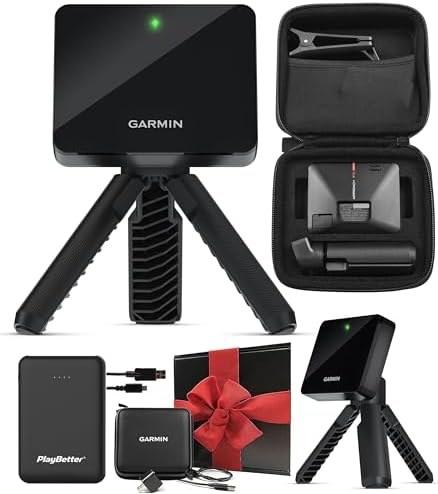
- Get More from Your Game: Train anywhere with the Approach R10 launch monitor and golf simulator featuring shot metrics, …
- Portable Launch Monitor That Brings the Course to You: This golf launch monitor portable device is lightweight enough to…
- Measures Key Metrics and Preloaded Courses: Improve your game with this Garmin launch monitor that provides key metrics …
The R10 weighs just 5.22 ounces and delivers 10 hours of battery life, making it the most portable option in this price range. It pioneered the affordable launch monitor category and remains competitive despite newer challengers.
Garmin’s Home Tee Hero software lets you play literally any golf course in the world on the driving range or in your simulator. While the graphics aren’t cutting-edge compared to newer competitors, the experience is genuinely enjoyable and functional.
The R10’s integration with the broader Garmin ecosystem provides unique advantages. If you use Garmin golf watches or CT10 club sensors, everything syncs seamlessly. Your practice data, on-course performance, and simulator rounds all appear in one unified app.
For accurate spin numbers, Garmin recommends using special Titleist RCT golf balls—similar to Rapsodo’s requirement. Without them, spin measurements become unreliable. The R10 doesn’t include any RCT balls with purchase.
Home Tee Hero requires a $99 annual subscription, while integration with third-party software like E6 Connect adds roughly $400 annually. The base unit provides solid practice data without subscriptions, but the simulator experience requires additional investment.
Setup requirements: Place the unit 6-8 feet behind the ball with at least 8 feet of ball flight into your net or screen, requiring about 14 feet total depth.
Best for: Golfers already in the Garmin ecosystem, or those prioritizing portability for both indoor and outdoor use. The mature app and reliable performance make it a safe choice, even if it’s no longer the only option.
OptiShot 2 Golf in a Box

- What’s Included: Enjoy indoor golf simulation with the included Optishot 2, software, USB cable, adjustable rubber tees,…
- Golf Swing Trainer: On 15 premium real-world golf courses, an infrared sensor tracks club speed, carry distance, face an…
- Superior: Enjoy indoor sports with our golf simulator for home with online/offline gameplay and keep golf balls containe…
This complete package includes an impact net, hitting mat, and access to fifteen golf courses, making it the most comprehensive budget option. For golfers starting from scratch, getting everything in one box simplifies the buying process.
OptiShot 2 tracks club path, face angle, and club speed using dual rows of high-speed infrared sensors. Unlike launch monitors that track ball flight, OptiShot measures club movement and calculates what should happen to the ball based on that data.
This approach has advantages and disadvantages. You can use foam balls, real balls, or no ball at all—the system only cares about your club. This makes it safer for tight spaces and eliminates concerns about ball retrieval. However, the calculated ball flight doesn’t account for mishits, skulled shots, or other contact issues that dramatically affect real golf.
The included software features 15 courses and various practice games. It’s not compatible with macOS Catalina but works on various Windows systems. The graphics are dated compared to modern simulators, but functionality remains solid for entertainment and basic practice.
Setup requirements: You need a computer (not included), approximately 10 feet of width, and basic room for swinging. The net included in the package handles most shots safely.
Best for: Families wanting golf entertainment, casual golfers who prioritize fun over precision data, or anyone testing whether they’ll actually use a simulator before investing heavily.
Voice Caddie Swing Caddie SC4 Pro
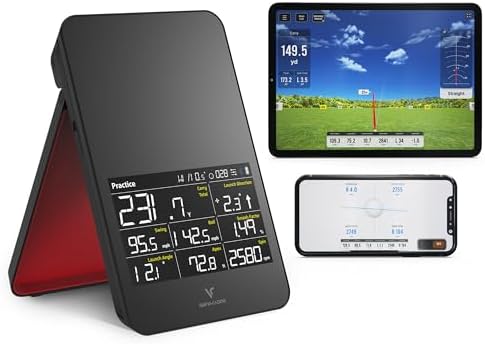
- Pro-Grade Accuracy with Prometrics Engine: The SC4 Pro golf launch monitor and golf shot tracker delivers precise ball a…
- Access to 3D Driving Range and E6 Connect Included: Enjoy the 3D Driving Range and E6 Connect home golf simulator with y…
- Connect to VOICECADDIE S App: Unlock advanced features like high-level statistical analysis, distance calibration, swing…
The SC4 Pro addressed initial launch issues like lack of third-party options and inaccurate spin readings, making it one of the best simulation options under $1,000. This Doppler radar unit provides atmospheric pressure calibration for more accurate outdoor readings.
What sets the SC4 Pro apart is its independence from subscription fees. Voice Caddie doesn’t require any subscriptions—a rarity in 2025 golf technology. You pay once and get full functionality forever. This makes long-term ownership costs significantly lower than competing systems.
The SC4 Pro includes five E6 Connect courses with purchase and supports full E6 integration if you want to expand your course library. However, the SC4 Pro is only compatible with E6 Connect, offering less flexibility than the MLM2PRO which works with GSPro, E6 Connect, and Awesome Golf.
The unit features a large color LCD display directly on the device, reducing dependence on your phone or tablet for immediate feedback. For range practice, this proves incredibly convenient.
Best for: Golfers who want solid performance without ongoing subscription costs, or those who primarily practice at the range where the built-in display provides instant feedback.
SLX MicroSim
- ACSS Cyclops Gen II reticle, Etched Reticle, works without illumination
- About half the size of our Compact 1x Prism and over 20% lighter
- 13 Illumination settings – Highest settings are Daylight Bright, Approx. 45,000 Hour battery life at medium setting for …
Formerly the Tittle X, the MicroSim weighs just 7.9 grams and uses E6 Connect simulator software. This ultra-compact sensor attaches to a toy stick or your actual club.
The MicroSim represents the absolute entry point for simulator technology. It doesn’t track actual balls and comes with a toy stick for swinging, though you can swing real clubs with foam or real balls if desired. The system measures your swing and calculates what should happen to the ball.
This approach works surprisingly well for basic practice and entertainment. Young golfers, beginners learning fundamentals, or casual players wanting winter fun all benefit from the MicroSim’s simplicity and low cost. Serious players looking to refine technique will quickly outgrow its limitations.
Best for: Children and beginners, golfers with extremely limited space, or anyone wanting the absolute cheapest introduction to simulation technology.
What You Actually Get for Under $1,000
Let’s be direct about what budget simulators can and cannot do.
You get: Accurate enough data on core metrics like carry distance, ball speed, and club speed. Immediate feedback that helps identify major swing flaws. Access to virtual golf courses that make practice more engaging. Portable units that work indoors and outdoors.
You don’t get: Precise spin axis measurements without special balls. Detailed club face data like some premium systems provide. Professional-grade accuracy on every shot type. Automatic club recognition. Putting analysis.
Budget-friendly options deliver impressive features for casual players and beginners, though they won’t match the ultra-realistic graphics and high-end sensors of premium simulators.
The key is understanding your goals. Beginners should prioritize ease of use and affordability with simulators that provide helpful feedback without overcomplicating things, while intermediate players benefit from detailed data like ball speed, clubhead speed, spin rate, and launch angle.
Additional Costs to Consider
The launch monitor purchase is just your starting point. Here’s what else you need:
Hitting mat: Quality mats range from $100-$400. Cheap mats hurt your wrists and provide unrealistic feedback. Companies like Fiberbuilt and Country Club Elite make durable options that protect your joints during extended practice sessions.
Impact screen or net: Basic golf nets cost $50-$150. Proper impact screens for projection run $200-$500. If you’re just tracking data without projecting images, a simple net works fine.
Software subscriptions: Premium memberships unlock features like spin rate measurements, multi-angle swing replays, and access to virtual courses, typically costing $99-$199 annually or $499 for lifetime access.
Special golf balls: Both the Rapsodo MLM2PRO and Garmin R10 require special marked balls for accurate spin readings. These cost $60-$70 per dozen. For indoor net practice, one dozen lasts months. For outdoor use, costs add up quickly.
Computer or tablet: Launch monitors connect via Bluetooth to your phone, tablet, or computer. Basic functionality works fine on smartphones. Running advanced simulator software requires a capable computer—budget $500-$1,000 for adequate performance.
Projector (optional): If you want to project courses onto a screen rather than viewing on a tablet, short-throw projectors start around $400. Quality units run $800-$1,500.
Realistically, expect to spend $800-$1,500 total for a functional budget simulator setup beyond just the launch monitor itself.
Space Requirements Reality Check
Budget simulators require at least 10 feet between floor and ceiling to prevent damaging your home at the top of your backswing, 15 feet of width for sufficient swinging space, and 7.5 feet from the mat to the net or screen for accurate launch and ball flight calculation.
Most launch monitors need 6-8 feet behind the ball for proper positioning. Add your stance and 7-8 feet of ball flight into your net, and you need 14-16 feet of depth minimum. This eliminates many spare bedrooms from consideration.
Garage conversions work well for budget simulators. Two-car garages typically provide 18-20 feet of width and 10-12 feet of depth—ample space for full swings. Single-car garages work but feel constrained with a driver.
Basements with 8-foot ceilings can accommodate iron and wedge practice. Taller players or those wanting to practice driver need 9+ feet of ceiling clearance.
Accuracy: Setting Realistic Expectations
Budget systems provide key metrics like swing speed, ball flight, and distance with solid accuracy to help understand and improve your game, but they don’t match professional-grade precision.
The Rapsodo MLM2PRO directly reads seven data metrics, while the Garmin Approach R10 directly measures only four—ball speed, club speed, launch angle, and launch direction—with the rest calculated by algorithms.
This matters more for some golfers than others. If you’re trying to dial in precise yardages for club fitting purposes, calculated data introduces enough variance to affect equipment decisions. For general practice and improvement, the accuracy proves sufficient.
Professional fitters use $10,000+ systems because equipment decisions worth thousands of dollars require precision within 1%. Budget systems operate within 2-5% accuracy for most metrics—close enough for practice, not precise enough for professional fitting work.
Understanding this distinction prevents disappointment. Budget launch monitors excel at identifying trends, major swing issues, and general performance patterns. They don’t provide the forensic accuracy needed for optimizing every variable.
Making the Most of Budget Technology
Maximize your budget simulator investment by focusing on what it does well.
Use it for gap identification: Budget systems excel at revealing distance gaps in your bag. Hit 10 shots with each club and compare carry distances. This data remains accurate enough to identify problem areas.
Focus on consistency over precision: Don’t obsess over whether your 7-iron carries exactly 165 or 167 yards. Instead, track your dispersion pattern. Are shots clustered tightly or scattered? That information drives real improvement.
Leverage video features: The MLM2PRO’s impact vision camera recording at 240 frames per second shows exactly where the club makes contact on the face—invaluable feedback that helps diagnose toe or heel strikes.
Practice with purpose: Budget simulators make terrible practice habits easy. Rapid-fire hitting without thinking doesn’t improve your game. Instead, use the immediate feedback to test swing changes and understand cause-and-effect relationships.
Combine with outdoor practice: Simulators work best as practice supplements, not replacements for real golf. The feel of different lies, wind effects, and course management decisions can’t be replicated indoors. Think of your simulator as an off-season training tool and winter entertainment, not a substitute for playing actual golf.
Frequently Asked Questions
What’s the difference between a launch monitor and a full golf simulator?
Launch monitors measure ball and club data but require separate components for the simulation experience. Full simulators include everything—tracking hardware, impact screens, projectors, and enclosures—in one package. Under $1,000, you’re buying launch monitors and building your own simulator around them. Complete packages at this price point sacrifice quality in tracking technology to include the other components.
Can budget simulators actually improve your golf game?
Yes, when used correctly. Simulators provide immediate feedback on ball flight, spin rates, and swing mechanics that help identify specific issues, and year-round practice maintains muscle memory and swing consistency. However, they work best combined with occasional outdoor play. The feel of real turf, wind, and course management differs significantly from simulator environments.
Do I need special golf balls for budget launch monitors?
The Rapsodo MLM2PRO requires special Callaway RPT golf balls for accurate spin measurements, costing $70 per dozen. Similarly, the Garmin R10 needs Titleist RCT golf balls for reliable spin data. Without these marked balls, basic distance and speed measurements remain accurate, but spin rates become unreliable. OptiShot 2 tracks club movement rather than ball flight, so you can use foam balls, real balls, or no ball at all.
How much does it really cost to set up a budget golf simulator?
The launch monitor is just the beginning. Expect total costs of $1,200-$2,000 for a functional setup including: launch monitor ($500-$700), quality hitting mat ($150-$300), impact screen or net ($100-$300), software subscriptions ($0-$199 annually), special golf balls ($60-$70), and potentially a projector ($400-$1,500 if you want visual simulation). The OptiShot 2 Golf in a Box at around $500-$600 provides the most complete package at the lowest price.
Which budget simulator is most accurate?
The Rapsodo MLM2PRO is widely considered the best launch monitor under $1,000, providing the most directly measured metrics. The new Square Golf Launch Monitor also shows incredibly impressive accuracy, competing directly with the MLM2PRO. The Garmin R10 remains highly capable despite measuring fewer metrics directly. All three systems perform within 2-5% accuracy of premium models for core measurements like carry distance and ball speed.
Can I use budget simulators outdoors?
The Garmin R10 works well outdoors since its radar-based technology isn’t affected by lighting conditions, though you should keep it dry as it’s not designed for rain. The Rapsodo MLM2PRO performs better outdoors with free ball flight but should avoid direct sunlight for optimal results. OptiShot 2 functions anywhere since it tracks club movement rather than ball flight. Outdoor versatility makes launch monitors excellent range companions for data-driven practice.
How do subscription costs affect long-term value?
Voice Caddie’s SC4 Pro stands out by requiring no subscriptions—rare in 2025 golf technology. The Garmin R10 requires $99 annually for Home Tee Hero simulation features. Rapsodo’s Premium Membership costs $199 annually or $499 for lifetime access. Over five years, subscription-free devices save $500-$1,000 compared to subscription-dependent competitors. Consider whether ongoing costs fit your budget or if paying more upfront for lifetime features makes better financial sense.
Will budget simulators work in my garage?
Most garages accommodate budget simulators well. Two-car garages provide ideal dimensions—18-20 feet wide and 10-12 feet deep. You need at least 10 feet of ceiling height for full swings, 15 feet of width for swinging freely, and 7.5 feet from mat to net. Single-car garages work but feel tight. Consider adding insulation and climate control for year-round comfort. Concrete floors work better than wood for absorbing impact vibration.
Can left-handed golfers use these systems?
The Garmin R10 automatically detects swings from both left and right-handed orientations without needing special settings or adjustments, providing consistent accuracy regardless of which side you play from. Most modern launch monitors handle both orientations seamlessly. You may need to reposition portable units slightly depending on your setup, but the technology doesn’t discriminate based on handedness.
What’s the best budget simulator for beginners?
Beginners should prioritize ease of use and affordability, looking for simulators that provide helpful feedback without overcomplicating things . The OptiShot 2 Golf in a Box offers the simplest complete solution. The Garmin R10 provides better data with straightforward setup. The SLX MicroSim is child and beginner-friendly at ultra-budget pricing. Avoid systems with complex software requirements or expensive ongoing subscriptions until you’re certain you’ll use the technology regularly.
The Bottom Line
Budget golf simulators have reached a tipping point where they deliver legitimate value without requiring professional-level investment. The technology works well enough to improve your game, track meaningful progress, and provide entertainment during off-season months.
The key to satisfaction lies in matching expectations with reality. You’re not getting a $15,000 professional system for $700. What you are getting is functional technology that answers important questions about your game: How far do you actually carry each club? Where is your miss pattern? What happens to ball flight when you make specific swing changes?
For most recreational golfers, that information proves valuable enough to justify the investment. The ability to practice during winter months, hit balls after work regardless of daylight, and track progress over time all contribute to better golf when you return to the course.
Start with a clear understanding of your space, budget, and goals. If you want professional-grade accuracy for club fitting purposes, save up for premium systems. If you want functional practice tools and winter entertainment, today’s budget options deliver surprisingly well.
The Rapsodo MLM2PRO currently offers the best combination of features, accuracy, and value at $699. The Garmin R10 at $599 remains highly competitive, especially for outdoor versatility. The OptiShot 2 Golf in a Box provides the most complete package for families prioritizing entertainment over precision data.
Whatever you choose, you’re investing in more opportunities to practice, better understanding of your game, and year-round golf regardless of weather. That beats standing in the cold at the range any day.